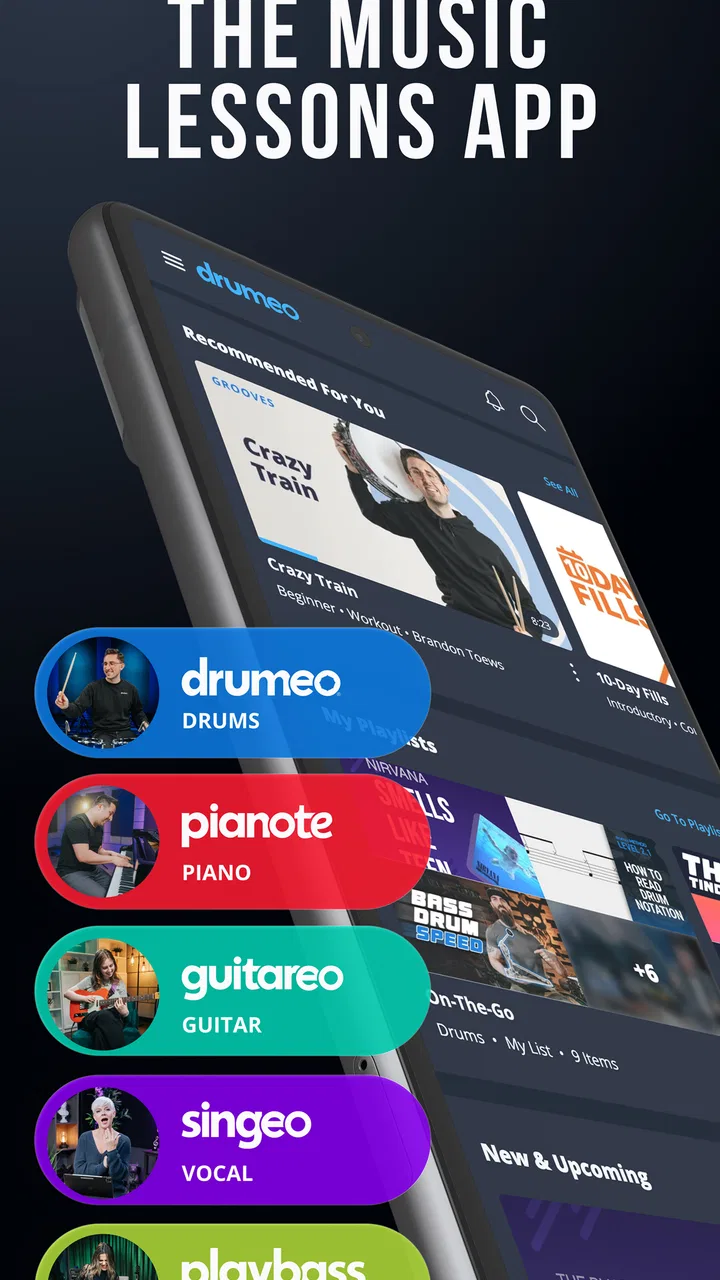
Musora: The Music Lessons App
- 4.3
- Rating
- 100.00K
- Installs
- Free
- Price

 Analysis by App-foxy
I approached Musora: The Music Lessons App as someone looking for a practical way to keep music practice moving, rather than as a replacement for a private teacher. It is an education app from Musora Media Inc. that brings lessons for drums, piano, guitar, bass, and singing into one place. That broad instrument coverage is its most obvious appeal, but the more useful question is whether the app fits the way you actually practise: in short sessions, during busy evenings, or with enough patience to follow a structured course.
My overall impression is positive, with one important qualification. This is most valuable when you treat it as a guided learning companion and return to it regularly. It is less convincing for someone who wants instant answers, a completely free library, or detailed personal correction from a teacher. The app is free to install, carries an Everyone 10+ content rating, and has reached over 100 thousand installs. Its average rating sits at 4.3 from around 2 thousand ratings, which feels consistent with an app that serves a wide range of learners well but cannot suit every instrument, schedule, and learning style equally.
How Musora feels during ordinary practice
I find Musora easiest to judge in the rhythm of an ordinary day: whether I can settle on one useful exercise, practise it, and leave the app without turning a quick session into a browsing detour. That makes the setup around the lesson matter almost as much as the lesson itself. From there, it is worth looking at the choices a learner can make when deciding how much structure to follow.
You May Also Like

 Blood Strike: 2.5 Anniversary
Blood Strike’s Loadouts Turn Every Drop Into a Tactical Gamble
A close look at Blood Strike’s custom loadouts: how fast access to signature weapons reshapes its battle royale rhythm, rewards preparation, and narrows the gap between fights.

 Pandora - Music & Podcasts
Pandora’s Music Is Easy to Start, but Harder to Recover
Pandora’s strength is its low-effort path from a seed to a station. Its weak spot is how much confidence it asks you to place in connection, setup, and quiet recovery.

 8 Ball Pool
 Is Built on Rivalries, Rematches, and Routine
A close look at the rivalries, rematches, shared routines, and unanswered safety questions that turn a quick pool match into a persistent mobile community.

 Samsung Music
’s Quiet Strength Is Playing What You Already Own
Its reach comes less from spectacle than from dependable access to a personal library. That simplicity is both the app’s strongest retention engine and its ceiling.

 AccuWeather: Weather Radar
AccuWeather Review: A Quick, Clear Forecast for Everyday Decisions
For everyday plans, the best forecast is the one you can understand quickly. AccuWeather makes rain timing, radar, and local conditions easy to act on, with a few trade-offs.

 Hill Climb Racing
Why Hill Climb Racing Still Turns Crashes Into One More Run
A tiny car, a bumpy hill and one more upgrade: Hill Climb Racing keeps resurfacing because its simple chaos makes every near-miss feel personal.
More From Our News Desk
View All News


Getting started without turning practice into a project
The strongest part of the concept is the step-by-step approach. Instead of forcing a beginner to search randomly for separate videos, the app gives the learning process a clearer shape. That matters when you are new to an instrument and do not yet know whether you should work on posture, rhythm, chords, scales, coordination, or songs first.
I can easily imagine opening it after work, choosing the instrument I want to maintain, and following one focused lesson rather than spending twenty minutes deciding what to watch. That small reduction in decision-making is a real benefit. Many free video platforms contain excellent music instruction, but they also make the learner responsible for building a sensible sequence. Musora is better suited to people who want that sequence prepared for them.
The app’s range is also useful in a household where several people play different instruments. One person can work on guitar while another explores piano or singing, without needing a separate learning service for every interest. It can also help a musician who wants to add a second instrument without abandoning the first. The trade-off is that a broad catalogue may feel less specialised than a service built around only one instrument.
Speed expectations and the value of short sessions
I would not judge this app by how quickly it opens a single lesson alone. Music-learning software has to do more than launch: it needs to get you from choosing a lesson to actually playing. The practical speed test is whether the path from opening the app to starting an exercise feels simple enough that you will use it on an ordinary day.
For that reason, I would use Musora in compact blocks. A ten-minute session focused on a single technique can be more useful than opening a huge catalogue and drifting between topics. If you are learning drums, for example, you might use one session to work on a steady pattern and save song practice for later. On piano, a short lesson followed by repeated slow playing is likely more productive than rushing through several unrelated topics.
There is also a psychological advantage to keeping the first session small. Beginners often quit because practice feels like an all-or-nothing commitment. A structured lesson makes it easier to begin, while the app’s multi-instrument design gives returning users somewhere to go when curiosity changes. I would still avoid assuming that every lesson will fit into the same amount of time. Some topics need repetition away from the screen, and the real work begins after the explanation ends.
What happens when you use it heavily
Longer practice periods reveal a different side of the experience. Watching several lessons in one sitting can be useful when you are trying to understand a new area, but it can also turn passive viewing into a substitute for playing. This is the main workflow mistake I would warn against: do not measure progress by how many lessons you finish. Stop often enough to put the device down and repeat the exercise on your instrument.
Musora works best when the screen acts as a coach at the beginning of a practice block, not as the entire practice block. I would watch or follow a small section, pause, play it repeatedly, and return only when I needed the next instruction. That approach reduces screen time and makes the lessons more active. It also helps if your phone or tablet becomes warm or sluggish during extended use, because you are not demanding continuous playback for the entire session.
Another useful habit is to choose the lesson before you pick up your instrument. That sounds minor, but it prevents the familiar problem of balancing a guitar or sitting at a keyboard while browsing. Once the lesson is selected, keep the device at a comfortable viewing angle and focus on the physical exercise. For drums, where both hands and feet may be occupied, a larger screen positioned safely nearby is likely more practical than holding a phone throughout.
Stability, interruptions, and returning to practice
Reliability matters more in an education app than in an occasional entertainment app. A missed moment in a lesson can interrupt concentration, and beginners may not know which instruction they missed. My expectation would be that the core experience is generally straightforward, but I would still build a recovery-friendly routine rather than relying on memory.
If an interruption occurs, return to the last clearly understood exercise instead of trying to guess what came next. Repeating a section is not wasted time in music education; it is often the point. I would also keep a small note of the technique being practised, especially when switching between instruments. That way, if you close the app or change activities, you can resume with a purpose rather than browsing again.
The current version is 3.1.2, and the app was released on November 8, 2019. Those details suggest a product with an established history rather than a brand-new experiment. They do not guarantee that every device will behave identically, so I would keep the operating system current enough for the app and avoid judging the whole service from one unusual interruption. The minimum operating system is Android 7.0, which makes it accessible to a fairly broad range of Android devices, although older hardware may still offer a less comfortable experience.
Device limits and choosing the right screen
A phone is convenient for checking a short instruction, but it is not always the best teaching surface. Music lessons involve hand position, movement, and sometimes a view of the instrument. On a small display, details can be harder to follow, especially when the device is placed several feet away. A tablet or larger phone should make visual guidance easier, provided it can be positioned securely and safely.
For singing, a phone may be perfectly adequate because the learner can focus on listening and vocal exercises. Guitar and bass sit somewhere in the middle: a phone is portable, but a larger screen can reduce the need to lean forward or repeatedly adjust the device. Piano and drums benefit most from a stable setup, since stopping to touch a screen can break the physical flow of practice.
I would not use the app as the only thing running on an already old or heavily loaded device. Close unrelated apps, keep enough free storage for normal system operation, and place the device where accidental contact with an instrument is unlikely. These are simple precautions, but they matter more during music practice than they do while reading an article. The app should support the session, not become another object you have to manage.
Resource demands are also about your surroundings. Video lessons can be harder to follow in a noisy room, and practicing with the device volume high may be unpleasant for other people. Headphones can help with spoken guidance, but you still need to hear your own playing. I would use them selectively: useful for a quiet vocal explanation, less useful when the main goal is judging your instrument’s natural sound.
What the free entry point really means
Musora is free to download, but it includes in-app purchases ranging from $1.99 to $280 per item. That is the point where expectations need to be realistic. You can try the app without paying at the installation stage, yet a serious learner should examine which lessons or learning paths remain available without purchase before building a long-term routine around it.
This pricing range makes the app potentially suitable for both casual exploration and deeper commitment, but it also means the value depends on how consistently you use the material. If you practise only once every few weeks, a paid option may not feel worthwhile. If the guided structure keeps you practising several times a week, it may offer more value than collecting random lessons from different sources. I would decide based on actual usage after trying the free experience, not on the size of the catalogue.
The best way to evaluate it is to choose one instrument and one concrete goal. For example, decide that you want to become more comfortable with basic guitar practice or establish a regular piano routine. Use the app long enough to see whether its teaching style keeps you engaged and whether the lesson flow matches your pace. Only then consider spending money. This prevents the common mistake of paying for broad access before knowing whether you enjoy the learning method.
Where it beats ordinary alternatives
Compared with searching through general video platforms, Musora’s clearest advantage is organisation. Free videos can be excellent, but their order, difficulty, and teaching style vary widely. A learner may jump from a beginner explanation to an advanced performance without noticing the gap. Musora is more appealing when you want a route rather than a collection of isolated clips.
Compared with a private teacher, the app is more flexible and usually easier to fit around an unpredictable schedule. You can practise late, repeat a section, or switch instruments without arranging an appointment. The weakness is equally clear: an app cannot watch your hands in the same personal way a teacher can, correct every small habit, or adapt instantly to your exact physical limitations.
Compared with a single-instrument service, the multi-instrument approach is a strength for curious musicians and a possible distraction for focused students. If your only goal is to prepare for a formal performance on one instrument, a specialised teacher or course may provide a tighter path. If you want a broad musical routine and like exploring, Musora’s range is much more attractive.
Three practical ways to get more from it
Use a lesson as a starting cue, not a finish line. Follow a small section, pause, and repeat it several times without looking at the screen. This turns the app from a video library into an actual practice tool.
Keep one active instrument at a time. The ability to explore drums, piano, guitar, bass, and singing is useful, but switching constantly can make progress feel vague. Choose one main track for the week and treat other instruments as occasional variety.
Match the device to the movement. Use a larger, stable screen for drums and piano when possible, and keep a phone for quick reference or vocal work. The right setup reduces interruptions and lets you keep both hands where they belong.
These habits also answer a question many new users have: can the app replace practice itself? No. It can make practice more directed, but progress still depends on repetition, listening, and correcting your own playing. The app is strongest when it removes uncertainty about what to work on next, not when it tries to do the playing for you.
Who should use it, and who should skip it
I would recommend Musora to beginners who feel lost when confronted with a large amount of online music content. It is also a good fit for adults with irregular schedules, people exploring a second instrument, and households where more than one person wants access to different kinds of lessons. The step-by-step format gives these users a better chance of practising consistently.
I would be more cautious if you already have a clear curriculum, need detailed feedback on technique, or are preparing for a specific examination or audition. In those cases, a qualified teacher or a tightly focused specialist course may be better. I would also skip it if you dislike guided lesson paths and prefer learning entirely by ear, from sheet music, or through your own collection of tutorials.
The app may not be ideal for someone who expects every useful lesson to remain free. Since purchases are part of the experience, check the available access before committing emotionally or financially. A free installation is a low-risk way to explore, but it should not be confused with unlimited instruction at no cost.
My performance verdict after weighing the trade-offs
Musora feels like a sensible education app for turning scattered musical interest into a repeatable routine. Its perceived speed matters less than its ability to get you into a lesson without unnecessary planning, and its biggest performance advantage is the reduction of friction between intention and practice. I would keep sessions focused, avoid leaving long lesson runs playing without active practice, and choose a device that suits the instrument.
Stability and recovery are easiest to manage when you practise in short sections and remember the exercise you are working on. The Android 7.0 minimum makes the app approachable for many users, while older devices may still be better suited to lighter, shorter sessions. I would not make promises about identical performance on every phone or tablet, but the established version history gives the app a more mature feel than a newly launched learning tool.
My final recommendation is therefore conditional but clear: try it if you want structured lessons across several instruments and need help deciding what to practise next. Give it a fair test with one specific goal, one stable device setup, and regular hands-on repetition. If you need personal correction, a narrow exam path, or a completely free resource, choose a teacher or specialised alternative instead. For the learner who wants a flexible musical coach in an everyday app, Musora: The Music Lessons App is a worthwhile place to begin, provided you treat the lessons as guidance and the real progress as something you create away from the screen.
FAQs for Musora: The Music Lessons App
01What is Musora, and how can it benefit me as a musician?
Musora is a comprehensive music lessons app designed for musicians of all levels. It offers structured lessons in various instruments, including guitar, piano, and drums, taught by professional instructors. The app provides video tutorials, practice tools, and community support, making it an excellent resource for improving your skills and staying motivated.
02Is Musora suitable for beginners, or is it more geared towards advanced musicians?
Musora caters to musicians of all skill levels. Beginners can benefit from its step-by-step lessons and foundational courses, while advanced musicians can explore more intricate techniques and genres. The app's diverse curriculum ensures that users can progress at their own pace, making it a versatile tool for anyone looking to enhance their musical abilities.
03What devices are compatible with Musora, and is there a difference between the Android and iOS versions?
Musora is available on both Android and iOS devices, ensuring broad accessibility. While the core features are consistent across platforms, some minor interface differences may exist due to operating system variations. Both versions provide seamless access to lessons, practice tools, and community forums, ensuring a cohesive learning experience.
04Does Musora offer a free trial, and what is the cost of a subscription?
Musora typically offers a free trial period, allowing users to explore the app's features before committing to a subscription. After the trial, the subscription cost varies based on the plan chosen, with options for monthly or annual billing. Pricing is competitive and reflects the extensive range of content and expert instruction available.
05How does Musora support community interaction and peer learning?
Musora fosters a vibrant community of musicians through its interactive forums and group challenges. Users can connect with peers, share progress, and participate in discussions. This sense of community enhances the learning experience by providing support, feedback, and motivation, making it easier to stay engaged and inspired.
Pros
- Wide range of instruments covered.
- High-quality video lessons available.
- Interactive practice tools included.
- Lessons cater to all skill levels.
- Regular updates with new content.
Cons
- Requires a stable internet connection.
- Subscription model can be costly.
- Limited offline access to content.
- Interface can be overwhelming initially.
- Some features locked behind paywall.

Musora: The Music Lessons App
Gallery